

How to Create Your Account and Navigate the Dashboard
Finding a job in South Africa can feel overwhelming, especially if you are not sure where to begin. Nasi iSPani is a dedicated job platform that links job seekers to career opportunities across South Africa. It brings together listings from multiple sources in one place and gives you tools to build your CV, track your applications, and even get AI-powered help with your job search.
To access all of these features, you need to create a free account. This guide will walk you through every step, from registering to exploring your dashboard, so you can start your job search online with confidence.
Get Started
Creating a free account on Nasi iSPani unlocks a full set of tools built to support your job search:
- Apply for jobs directly through the platform
- Build and download a professional CV using AI assistance
- Save up to 5 jobs to revisit later (free plan)
- Track up to 2 jobs and 2 keywords on the free plan
- Use AI Buddy to get personalised job search help
- Monitor your application pipeline: Saved, Applied, Interviewing, Offered, Rejected
- Receive 15,000 AI credits per day on the free plan
Step-by-Step Guide: How to Create Your Account
The sign-up process takes less than five minutes and is completely free.
Step 1: Visit the Website
Open your browser on your phone or computer and go to nasi-ispani.co.za.
The platform works well on any smartphone. You do not need a computer to register.
Step 2: Click the “Register” Button
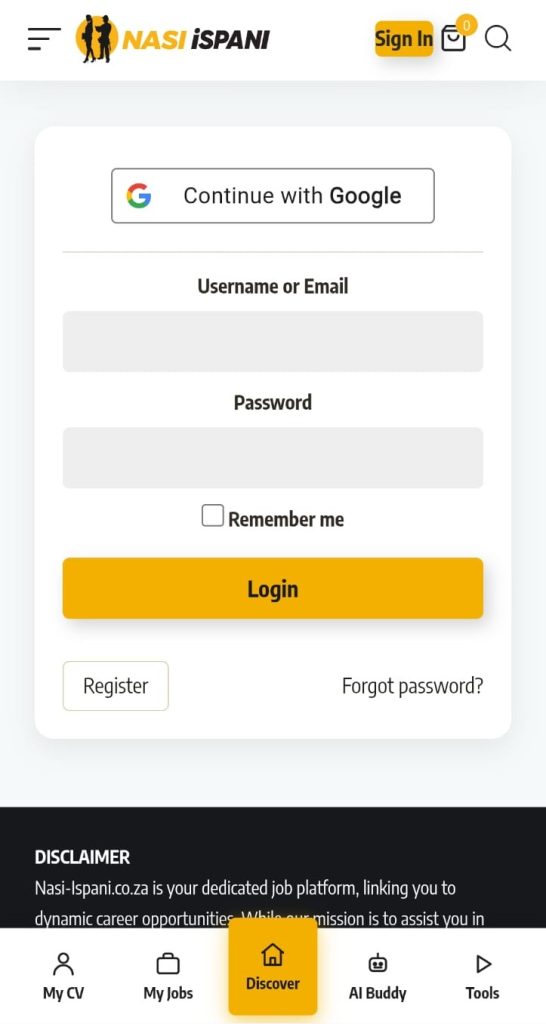
On the login page you will see two options: you can sign in with your Google account for a faster sign-up, or register manually using your email address. To register manually, tap the Register button below the login form.
Using “Continue with Google” is the quickest option if you already have a Gmail address — no extra password needed.
Step 3: Enter Your Personal Details
Fill in the registration form with the following:
- Your full name
- A valid email address
- A secure password
Double-check your email address. You will need it to verify your account and to log in every time.
Step 4: Create a Secure Password
A strong password should:
- Be at least 8 characters long
- Include a mix of letters, numbers, and symbols
- Not include your name, birthdate, or simple patterns like 1234
Tick the “Remember me” box on your personal device so the platform keeps you signed in.
Step 5: Submit Your Registration
Once all your details are filled in correctly, click Submit or Register. If any fields are incorrect, the form will highlight them for you to fix before you can proceed.
Email Verification Process
After registering, Nasi iSPani will send a verification email to the address you provided. This step confirms your email is valid and keeps your account secure.
How to Verify Your Email
- Open your email inbox
- Look for an email from Nasi iSPani with a subject like “Verify Your Account”
- Click the verification link inside the email
- You will be redirected back to Nasi iSPani and your account will be activated
What If the Email Doesn’t Arrive?
- Check your Spam or Junk folder first
- Wait a few minutes — there may be a short delay
- Return to the site and request a new verification email
- Make sure you entered your email address correctly during registration
If the email still hasn’t arrived after 30 minutes, contact support through the website.
Logging In for the First Time
Once your email is verified, go to nasi-ispani.co.za. You have two ways to sign in:
- Continue with Google — if you registered with your Gmail account
- Username or Email + Password — if you registered manually
Enter your details and click the yellow Login button. Tick “Remember me” if you are on your personal phone so you stay signed in.
Forgot Your Password?
Click “Forgot password?” on the right side of the login form. Enter your email address and follow the reset link sent to your inbox to create a new password and regain access.
Your Nasi iSPani Dashboard: An Overview
Once you are logged in, you navigate the platform using the bottom navigation bar, which has five tabs. Here is what each one does.
My CV — Build Your Professional Profile
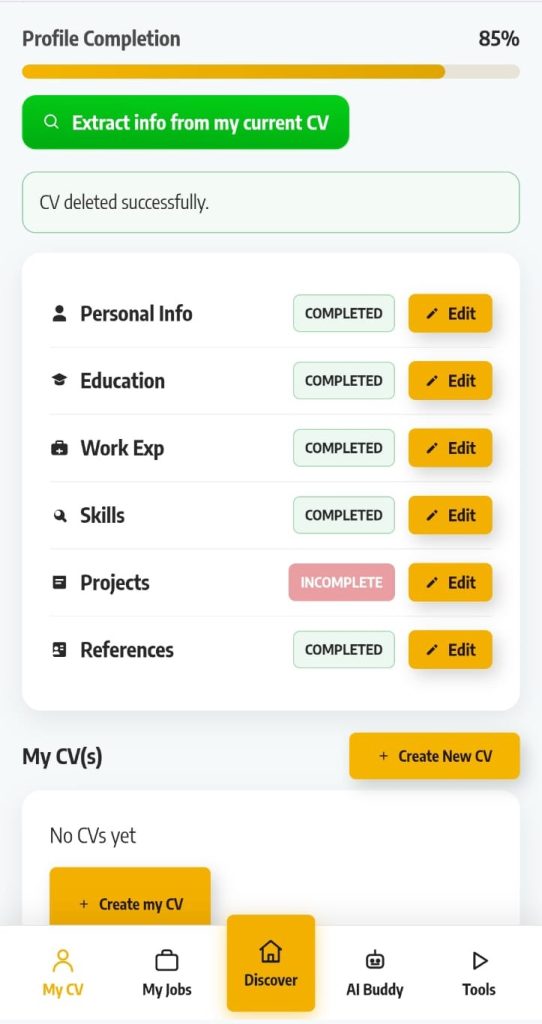
This is where you build and manage your professional CV. Your profile is divided into six sections:
- Personal Info
- Education
- Work Experience
- Skills
- Projects
- References
A Profile Completion bar at the top shows your percentage. Aim to get this as close to 100% as possible — a complete profile improves your visibility to employers and makes the platform’s AI tools work better for you.
Use the green “Extract info from my current CV” button to automatically pull your details from an existing CV, saving you time on data entry.
Once your profile sections are filled in, tap “Create my CV” to generate a formatted, downloadable CV.
Each section shows a COMPLETED or INCOMPLETE badge. Tap Edit next to any incomplete section to fill it in and boost your profile score.
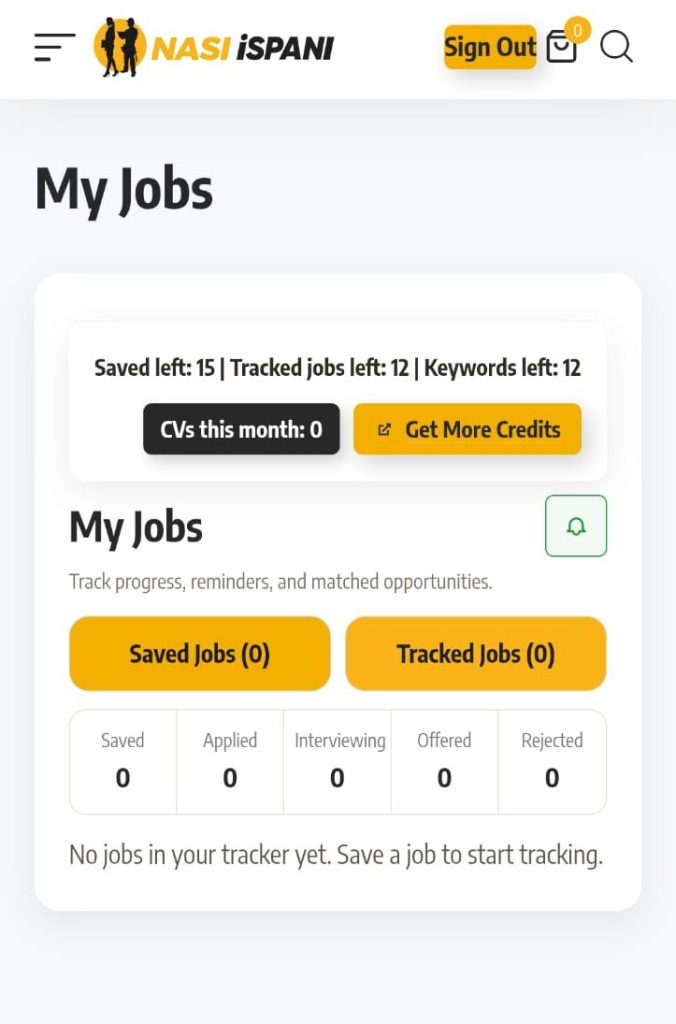
My Jobs — Track Every Application
My Jobs is your full application tracking hub. Every job you save or apply for is organised across five stages:
- Saved — jobs you have bookmarked to apply for later
- Applied — applications you have submitted
- Interviewing — jobs where you have been called in for an interview
- Offered — jobs where you have received an offer
- Rejected — applications that were not successful
The free plan lets you save up to 15 jobs and track up to 12 jobs and 12 keywords. Tap the bell icon to set up job alerts so you never miss a new listing.
Tap “Get More Credits” to upgrade and unlock more saved jobs, tracked jobs, and daily AI credits.
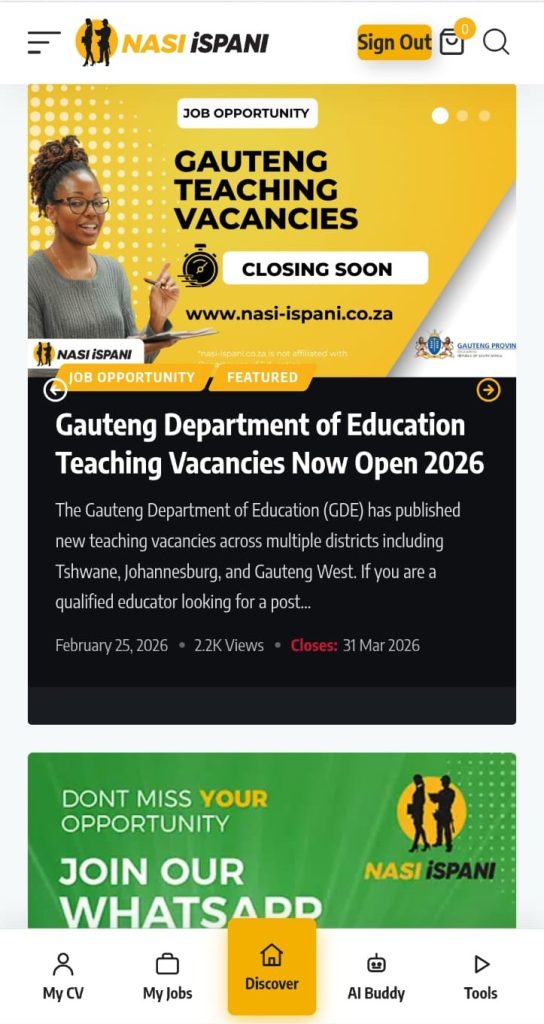
Discover
This is the main job browsing section and the homepage you land on when you open the app. Use it to search for new listings, browse job categories, and filter by location.
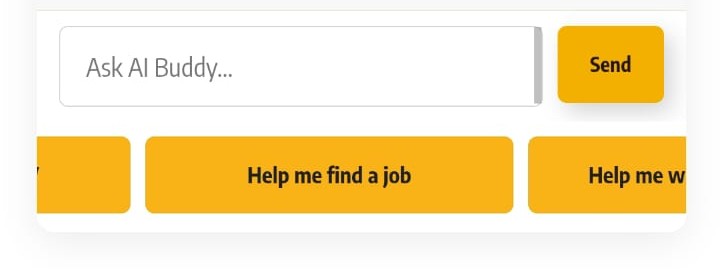
AI Buddy — Your Personal Job Search Assistant
AI Buddy is Nasi iSPani’s built-in AI assistant. Type any question into the chat, or tap one of the quick-start buttons such as “Help me find a job”.
AI Buddy uses your profile and the platform’s live listings to give you personalised guidance.
On the free plan you receive 15,000 AI credits per day to use this feature.
💡 Try asking AI Buddy: “What jobs match my skills?” or “Help me write a cover letter.”
Tools
The Tools tab gives you access to additional career resources and profile enhancement features to support your job search.
How to Start Your Job Search Online
Using the Search Bar
In the Discover section, type a job title, skill, or keyword into the search bar. Try “General Worker”, “Admin”, “Cashier”, or “Driver” to get started.
Filtering by Location and Category
Use the filters to narrow your results by province, city, or job category. This helps you focus on opportunities that are genuinely accessible to you.
Saving and Applying for Jobs
When you find a job you are interested in, you can save it to your My Jobs tracker or tap Apply to submit an application. Make sure your profile is as complete as possible before applying so employers see your full details.
Using AI Buddy to Find Jobs
Not sure what to search for? Open the AI Buddy tab and tap “Help me find a job”. The AI will ask you a few questions and suggest suitable roles based on your profile and skills.
Understanding Your Membership
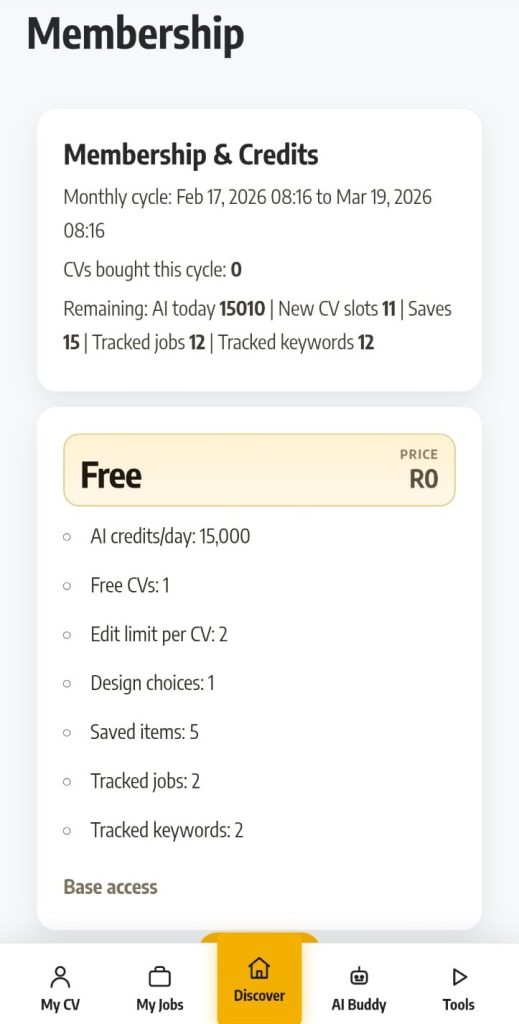
Free Plan — R0
The free plan gives you everything you need to get started at no cost:
- 15,000 AI credits per day
- 1 free CV slot
- 2 edits per CV
- 1 CV design choice
- 5 saved items
- 2 tracked jobs
- 2 tracked keywords
New CV Add-On — R49 Once-Off
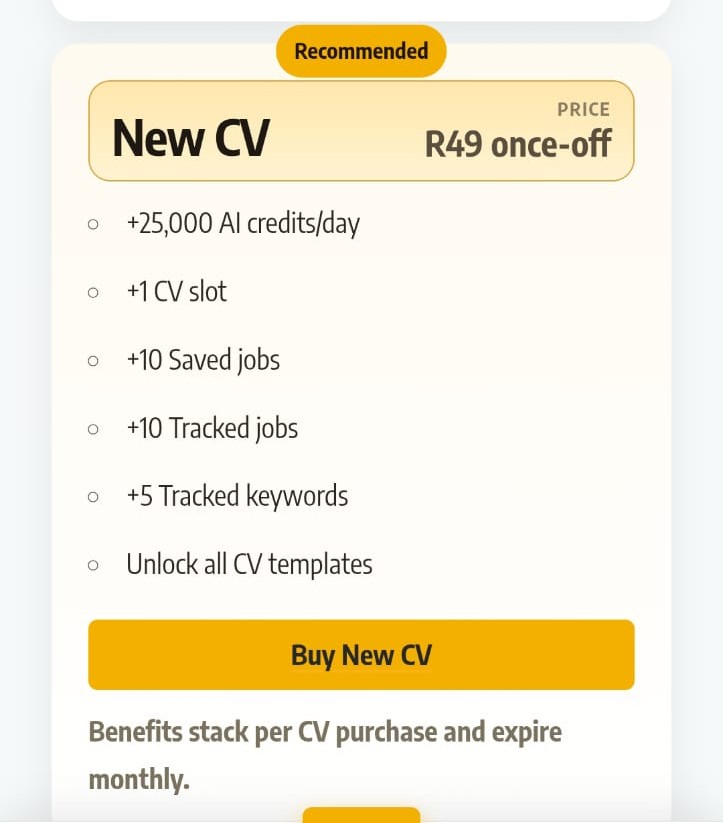
If you need more features, the New CV add-on is available for R49 per purchase. Each purchase adds:
- +25,000 AI credits per day
- +1 CV slot with access to all CV design templates
- +10 saved jobs
- +10 tracked jobs
- +5 tracked keywords
Benefits stack per CV purchase and expire monthly. The more CVs you purchase, the more credits and features you unlock.
Common Issues and Quick Fixes
I Cannot Log In
- Check that your email and password are entered correctly
- Make sure Caps Lock is not switched on
- Use “Forgot password?” to reset your credentials
- Try signing in with Google if you originally registered that way
I Did Not Receive the Verification Email
- Check your Spam or Junk folder
- Request a new verification email from the site
- Confirm you used the correct email address when registering
My Profile Sections Show as Incomplete
- Tap Edit next to any incomplete section
- Fill in all required fields and tap Save before exiting
- The Projects section is optional but completing it increases your profile score
The Website Does Not Display Correctly on My Phone
- Make sure your browser (Chrome or Firefox) is up to date
- Clear your browser cache and refresh the page
- Try switching between mobile data and Wi-Fi
I Have Run Out of AI Credits
- AI credits reset every day — your free allowance is 15,000 credits per day
- Purchase a New CV add-on (R49) to unlock an additional 25,000 credits per day
Frequently Asked Questions
Is Nasi iSPani free to use?
Yes. The free plan is available at R0 and includes access to job listings, a CV builder, AI Buddy, and job tracking features.
Can I use Nasi iSPani on my mobile phone?
Yes. The platform is fully mobile-friendly and works on any smartphone via your browser at nasi-ispani.co.za.
How do I sign up faster?
Tap “Continue with Google” on the login page to register instantly using your existing Gmail account — no extra password needed.
What is AI Buddy?
AI Buddy is the platform’s built-in AI assistant. It can help you find suitable jobs, write cover letters, and improve your CV. You get 15,000 free AI credits per day on the free plan.
What does the R49 New CV add-on include?
For R49 once-off you get an additional CV slot, access to all CV design templates, more tracked jobs, more saved jobs, and an extra 25,000 AI credits per day. Benefits stack per purchase and expire monthly.
How do I track my job applications?
Go to the My Jobs tab. Your applications are organised by stage: Saved, Applied, Interviewing, Offered, and Rejected.
What should I do if I forget my password?
Click “Forgot password?” on the login page, enter your email address, and follow the reset instructions sent to your inbox. You can also sign in with Google if you registered that way.
Does Nasi iSPani employ people directly?
No. Nasi iSPani is an independent platform that aggregates opportunities from third-party sources. It is not affiliated with any government department and does not employ or recruit candidates directly.
Get Hired
Nasi iSPani is one of the most complete free job search tools available in South Africa. With a free account you get access to job listings, an AI-powered CV builder, application tracking, and a personal AI assistant, all from your smartphone.
The sign-up process takes less than five minutes and costs nothing. Complete your profile, let AI Buddy guide you, and start applying for jobs today.
→ Register for free today at nasi-ispani.co.za
Already have an account? Log in to your Nasi iSPani dashboard now and explore the latest job opportunities near you.