Sending out CV after CV and hearing nothing back is one of the most demoralising parts of job hunting. The problem is rarely that you lack ability. More often, it is that a one-page CV asks an employer to take your word for it. A skills portfolio does the opposite. It shows the proof.
- What Is a Skills Portfolio?
- Why a Skills Portfolio Matters Right Now
- Step 1: Decide What Your Skills Portfolio Needs to Prove
- Step 2: Gather Your Evidence
- Step 3: Choose a Free Tool to Host Your Skills Portfolio
- Step 4: Structure Your Skills Portfolio Properly
- Step 5: Build Samples When You Have Nothing to Show
- Step 6: Check It Before You Share It
- Step 7: Share It and Keep It Alive
- Use the Free Nasi iSpani Tools Alongside Your Skills Portfolio
- Common Mistakes to Avoid
- Frequently Asked Questions (FAQs)
- Start Building Your Skills Portfolio Today
The good news is that you do not need money, a design degree or a laptop with expensive software to build one. Everything in this guide can be done for free, and most of it can be done on a phone. Here is how to create a skills portfolio using free tools, step by step.
What Is a Skills Portfolio?

A skills portfolio is an organised collection of evidence that demonstrates what you can actually do. Where a CV lists claims (“proficient in Excel”, “strong communicator”), a skills portfolio shows the spreadsheet you built, the report you wrote, the campaign you ran or the certificate you earned.
It usually lives online as a simple website, a shared folder or a PDF you can attach to an application. It is not the same thing as a creative portfolio. You do not need to be a designer or photographer to have one. Admin assistants, data capturers, call centre agents, teachers, bookkeepers and community organisers all benefit from a skills portfolio.
RELATED: Skills-based hiring in South Africa and what it means for young job seekers
Why a Skills Portfolio Matters Right Now

Hiring in South Africa is shifting. More employers are screening for demonstrated competence rather than qualifications alone, partly because the youth unemployment rate remains stubbornly high and applicant pools for every advertised post are enormous. When a recruiter is looking at 400 applications for one junior role, the candidate who attaches a link to real work is the one who gets remembered.
A skills portfolio also does three quiet things for you:
- It forces you to audit your own abilities, which makes interviews far easier.
- It gives you something to build during periods of unemployment, so the gap on your CV becomes a period of visible productivity.
- It works while you sleep. A public link can be found by recruiters searching for candidates.
Step 1: Decide What Your Skills Portfolio Needs to Prove
Before you open a single tool, get clear on the target. Pull up three or four job adverts for roles you genuinely want and highlight every skill they mention. You will see the same handful repeat: Microsoft Excel, customer service, report writing, social media management, stock control, data capturing, problem solving.
Those repeated skills become the backbone of your skills portfolio. Aim for four to six core skills. Any more and the portfolio becomes a warehouse rather than a showcase.
Write each one down and, next to it, answer a simple question: what could I show someone that proves this?
Step 2: Gather Your Evidence
Now collect what you already have. Most people underestimate this drastically. Dig through your emails, phone gallery, Google Drive, old flash drives and school or college files for:
- Certificates from short courses, learnerships, internships or workshops
- Assignments, projects, research reports or presentations from your studies
- Spreadsheets, rosters, budgets or trackers you built in a previous job
- Photos of events you helped organise or stock displays you managed
- Social media posts or graphics you designed
- Written references, thank you emails or performance feedback
- Volunteer work, church admin, stokvel treasury duties, sports club coordination
That last category matters. Unpaid work counts as evidence. If you managed the books for a family business or ran a school fundraiser, that is real project management and real financial administration.
RELATED: Free short courses you can complete online to boost your CV
Step 3: Choose a Free Tool to Host Your Skills Portfolio
You have plenty of options, and none of them needs a card.
Google Sites is the simplest free website builder available. It is drag-and-drop, works in a browser, and gives you a shareable link. If you have a Gmail address, you already have access at sites.google.com. This is the best default choice for most people.
Canva offers free portfolio and CV templates you can publish as a website or export as a PDF. Sign up at canva.com. Canva is ideal if you want your skills portfolio to look polished without needing to know anything about design.
LinkedIn doubles as a live portfolio. The Featured section lets you pin documents, links and images directly to your profile, and the Projects and Licenses sections hold your course certificates. Create or update yours at linkedin.com.
GitHub is essential if your skills are technical. Code, data analysis notebooks and automation scripts belong here. Free accounts get unlimited public repositories at github.com.
Behance is the standard for design, photography, illustration and video work. It is free and owned by Adobe. Find it at behance.net.
Notion gives you a clean, structured page that you can publish to the web for free. It suits people who want something more like an organised document than a website.
You only need one. Pick the tool that matches your field and your comfort level, and start there.
RELATED: Free productivity tools every South African job seeker should be using
Step 4: Structure Your Skills Portfolio Properly
Structure is what separates a professional skills portfolio from a messy folder of files. Use these sections:
Homepage or introduction. Your name, the role you are targeting, and two or three sentences about what you do. Add a clear, friendly headshot if you have one. Include your email and phone number.
Skills summary. List your four to six core skills with a single line explaining your level and where you developed each one.
Work samples. This is the heart of it. Give each sample its own short entry with a title, one line on the context, one line on what you did, and one line on the result. Then link to or embed the actual artefact.
Certificates and qualifications. Upload clean scans or screenshots. Include the issuing body and the date.
References. Two contactable people, with permission, plus their role and relationship to you.
Contact. Repeat it at the bottom. Never make someone hunt for how to reach you.
Step 5: Build Samples When You Have Nothing to Show
This is the situation most first-time job seekers find themselves in, and it is completely solvable. You can manufacture legitimate evidence.
Create a mock project. Build a monthly household or small business budget in Google Sheets with formulas and a chart. Write a 500-word market research summary on an industry you want to enter. Design a set of three social media posts for a local business you admire. Draft a customer complaint response letter.
Complete a free course with a certificate. Platforms like Alison, Coursera, Google Digital Skills and Microsoft Learn all offer no-cost options that end in a shareable certificate.
Volunteer for something small. Offer to run the Facebook page for a local NPO or spaza shop for one month. You get real results to report and a real reference.
Label mock work honestly as a practice project. Employers respect initiative far more than they penalise the absence of a client.
RELATED: How micro-credentials are changing the way employers assess young candidates
Step 6: Check It Before You Share It
Run through this list before your skills portfolio goes anywhere near a recruiter:
- Open the link on a phone. Most people will view it on mobile first.
- Test every single link and download.
- Set sharing permissions to “anyone with the link can view”. A broken permission setting is the most common mistake by a wide margin.
- Proofread twice, then have someone else read it.
- Remove your full ID number, home address and any confidential employer information.
- Keep total file sizes small so the pages load on limited data.
Step 7: Share It and Keep It Alive
Add the link to the top of your CV next to your contact details. Put it in your email signature. Add it to your LinkedIn headline or About section. Include it in the message body when you apply, not only as an attachment.
Then diarise a monthly reminder to update it. A skills portfolio that stops in 2024 is worse than no portfolio at all, because it signals abandonment. Fifteen minutes a month is enough.
Use the Free Nasi iSpani Tools Alongside Your Skills Portfolio
Your skills portfolio works hardest when the rest of your application is just as sharp. Nasi iSpani has a set of free tools built for exactly that, and you can find all of them at nasi-ispani.co.za/tools. You need a free account to unlock them, and signing up takes under five minutes on a phone.
CV Builder. Fill in your details and download a clean, professional CV as a PDF. Add your skills portfolio link right at the top next to your contact details so every recruiter sees it first.
ATS Resume Scanner. Most large employers screen CVs with applicant tracking software before a human ever reads them. The scanner compares your CV against a specific job advert and shows you which keywords are missing. Run it before every single application.
Cover Letter Writer. Generates a tailored letter you can edit, which is the natural place to point directly at one or two of the strongest samples in your skills portfolio.
AI Buddy. Ask it what jobs match your skills, or ask it to help you describe a work sample properly. It draws on your profile and the platform’s live listings.
Job Tracker. Organises every opportunity you save or apply for across five stages, so you always know what is outstanding and when to follow up.
Common Mistakes to Avoid
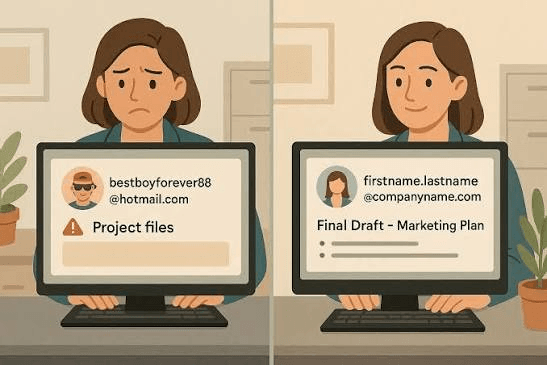
Do not overload it. Six strong samples beat twenty weak ones. Do not use a personal email address like partyanimal2003@gmail.com; create a professional one. Do not upload blurry photographs of certificates taken at an angle. Do not include confidential documents from a previous employer. Do not write long paragraphs of text with no headings, because nobody reads them.
Frequently Asked Questions (FAQs)
How long should a skills portfolio be?
Between four and eight samples is ideal. A recruiter will typically spend two to three minutes on it, so quality and clarity matter far more than volume.
Do I need a skills portfolio if I have no work experience?
Yes, and arguably you need one more than an experienced candidate does. Coursework, mock projects, volunteer work and free course certificates all serve as valid evidence.
Is a skills portfolio the same as a CV?
No. Your CV is a summary document that gets you onto the shortlist. Your skills portfolio is the supporting evidence that proves the claims in it. Use both together.
Can I build a skills portfolio on my phone?
Yes. Canva, Google Sites, LinkedIn and Notion all have functional mobile apps. A laptop makes formatting easier, but it is not a requirement.
Should my skills portfolio be public or private?
Public is better for discoverability, as long as you have removed sensitive personal information. If you are currently employed and job hunting quietly, use a link that is unlisted but viewable.
How often should I update it?
Once a month, or immediately after finishing any course, project or job. Set a recurring calendar reminder so it does not slip.
Start Building Your Skills Portfolio Today
The strongest thing about a skills portfolio is that building one is entirely within your control. You cannot control which employer calls back, but you can control whether you walk into the next interview with proof in your hand. Open Google Sites or Canva tonight, add one work sample, and build from there.