

Applying for jobs, internships, learnerships, or bursaries in South Africa is not just about having a CV anymore. Many employers now use ATS (Applicant Tracking Systems) to scan CVs before a recruiter reads them. If your CV is not ATS-friendly, it may be rejected automatically even if you qualify.
To help job seekers apply with confidence, Nasi iSpani has added a new free tool:
ATS Resume Scanner
https://www.nasi-ispani.co.za/ats-resume-scanner/
This tool checks your CV, shows mistakes, and helps you fix them before you apply.
What is the ATS Resume Scanner?
The ATS Resume Scanner is a tool that checks whether your CV can be read correctly by employer systems.
Many companies use ATS software to:
- Scan CVs
- Look for keywords
- Check formatting
- Match your CV with the job description
If your CV has the wrong format, missing keywords, or unreadable sections, the system may reject it before a human sees it.
The Nasi iSpani ATS Resume Scanner helps you avoid this problem.
How to Use the ATS Resume Scanner
Using the ATS Resume Scanner on Nasi iSpani is quick and easy. Follow these steps to check if your CV is ready for job applications.
Step 1: Open the ATS Resume Scanner page
Go to the tool here:
https://www.nasi-ispani.co.za/ats-resume-scanner/
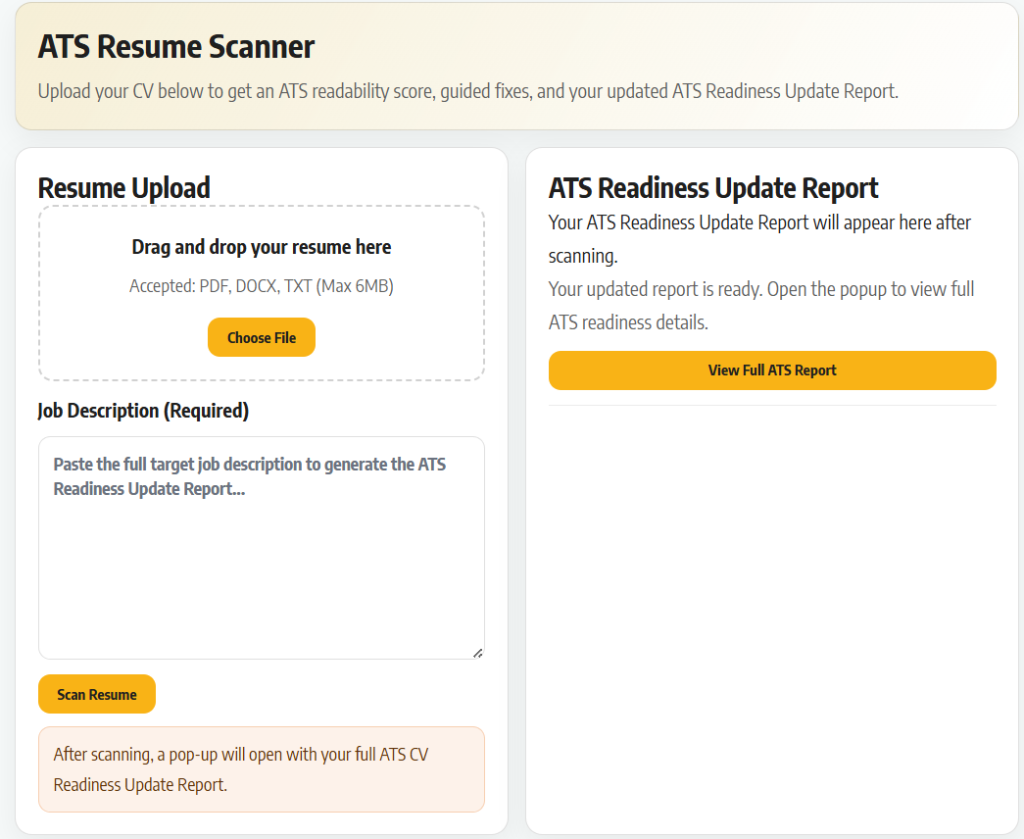
You will see the CV upload section and the job description box.
Step 2: Upload your CV
Click Choose File or drag and drop your CV into the upload area.
Accepted file formats:
- DOCX (Word)
Make sure you upload the CV you plan to use when applying for jobs.
Step 3: Paste the Job Description (Required)
Copy the full job advert you want to apply for and paste it into the Job Description box.
This step is important because the scanner will compare:
- Your CV skills
- Your experience
- Keywords in the job advert
The more accurate the job description, the better your report will be.
You can paste job descriptions from:
- Job websites
- Company career pages
- Government vacancies
- Learnership or internship adverts
Step 4: Click “Scan Resume”
After uploading your CV and pasting the job description, click the Scan Resume button.
The tool will analyse your CV using ATS rules that many employers use.
This may take a few seconds.
Step 5: View Your ATS Readiness Update Report
After scanning, your ATS Readiness Report will appear.
This report shows how well your CV will perform when scanned by employer systems.
Your report may include:
- ATS score – how readable your CV is
- Missing keywords – words from the job advert not in your CV
- Formatting issues – problems that ATS may not read
- Skills match – how well your CV fits the job
- Suggestions to improve your CV
- Tips to make your CV stronger
Use this feedback to update your CV before you apply.
Step 6: Fix Your CV and Scan Again
After viewing your ATS report, you can fix the problems in your CV and scan it again to improve your score.
You can edit or rebuild your CV inside your Nasi iSpani profile here:
https://www.nasi-ispani.co.za/profile/
If you are not sure how to create a strong CV, follow this guide:
https://www.nasi-ispani.co.za/build-a-professional-cv-using-nasi-ispani/
The guide will show you how to:
- Build a professional CV step by step
- Use the Nasi iSpani CV Builder
- Add the right skills and experience
- Format your CV correctly for ATS systems
After fixing your CV, upload it again in the ATS Resume Scanner and scan it again.
This helps you:
- Improve your ATS score
- Match the job better
- Increase your chances of getting shortlisted
Many job seekers apply without checking their CV first.
Using the ATS Resume Scanner together with the CV Builder gives you a better chance of getting noticed by employers.
Why This Tool is Important for South African Job Seekers
Many young people apply for jobs but never get feedback.
Sometimes the problem is not experience, it is the CV format.
ATS systems are used by:
- Government departments
- Big companies
- Banks
- Retail companies
- Learnership & internship programmes
If your CV is not ATS-friendly, it may never reach the recruiter.
That is why we added this tool, to give South African youth a fair chance.
Part of the Nasi iSpani Job Search Tools
The ATS Resume Scanner is one of the tools we created to make job searching easier.
You can also use:
- CV Builder
- Job Tracker
- AI Career Assistant
- Career Guides
- Application Tips
- ATS Resume Scanner
Our goal is simple:
Help you apply smarter and get more responses.
Try the ATS Resume Scanner
Use the tool here:
https://www.nasi-ispani.co.za/ats-resume-scanner/
Scan your CV, fix mistakes, and apply with confidence.