

Writing a cover letter or job application email can be difficult, especially if you are applying for many jobs, internships, or learnerships. Many job seekers are rejected not because they are not qualified, but because their application message is too short, unprofessional, or missing important details.
To make job applications easier, Nasi iSpani has added a free tool:
AI Cover Letter & Application Email Generator
https://www.nasi-ispani.co.za/ai-cover-letter-email-generator/
This tool helps you write a professional job application email in seconds.
What is the AI Cover Letter & Email Generator?
The AI Generator is a tool that creates a professional application based on the job you want.
Instead of writing from scratch, the tool guides you step-by-step and generates a message you can use when applying for jobs.
AI cover letter tools help job seekers:
- Save time
- Write professional applications
- Use the right keywords
- Match the job description
- Avoid mistakes
Many modern job applications require a cover letter or email together with your CV, and having a good one can improve your chances of getting shortlisted.
How to Use the AI Cover Letter Generator
Follow these steps to create your cover letter.
Step 1: Open the Generator Page
Go to the tool here:
https://www.nasi-ispani.co.za/ai-cover-letter-email-generator/
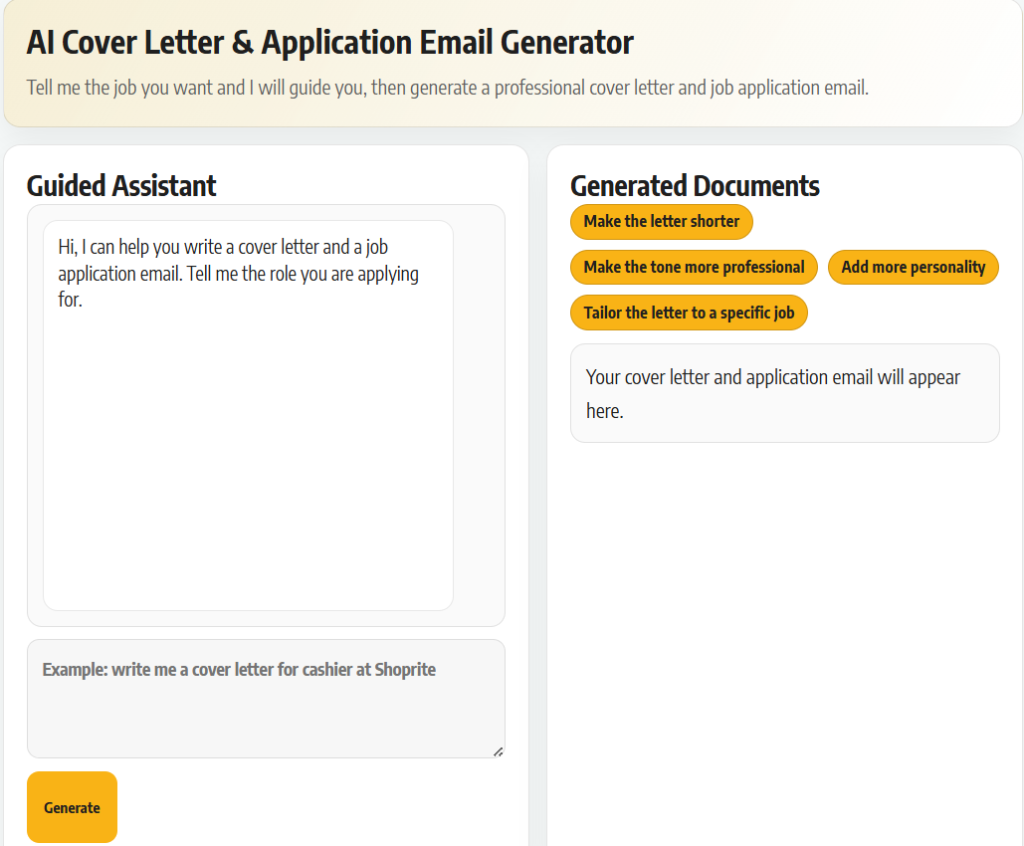
You will see the AI assistant where you can type the job you are applying for.
Step 2: Tell the Assistant the Job You Want
Type the job title or role you are applying for.
Example:
- General Worker
- Admin Clerk
- Internship in Finance
- Retail Assistant
- Learnership Programme
You can also include:
- Company name
- Your skills
- Your experience
The more details you give, the better your letter will be.
AI tools work best when they can match your experience with the job requirements.
Step 3: Generate Your Cover Letter and Email
After entering the job details, the tool will generate:
- A cover letter
- A job application email
You can then use the buttons to improve it, for example:
- Make the letter shorter
- Make the tone more professional
- Add more personality
- Tailor the letter to a specific job
This helps you create a message that looks natural and professional.
Step 4: Copy and Use the Letter for Your Application
Once the letter is ready, you can copy it and use it when applying.
You can use it for:
- Online job applications
- Email applications
- Government vacancies
- Learnership applications
- Internship applications
- Bursary applications
Always read the letter first and make small changes if needed.
Even when using AI, your application should still match your real skills and experience.
Step 5: Make Sure Your CV Matches
Your cover letter and CV should always match.
If your CV needs fixing, you can update it here:
https://www.nasi-ispani.co.za/profile/
You can also follow this guide to build a professional CV:
https://www.nasi-ispani.co.za/build-a-professional-cv-using-nasi-ispani/
Having a strong CV and a good cover letter together will improve your chances of getting interviews.
Part of the Nasi iSpani Job Search Tools
The AI Generator is one of the tools we created to help South African youth apply for jobs more easily.
You can also use:
- CV Builder
- ATS Resume Scanner
- Job Tracker
- AI Career Assistant
- Career Guides
Our goal is to help you apply smarter and get more responses.
Try the AI Cover Letter Generator
Use the tool here:
https://www.nasi-ispani.co.za/ai-cover-letter-email-generator/
Create your cover letter, send better applications, and increase your chances of getting hired.